
How to unblock a WhatsApp account: the step-by-step guide that works
What to write in the review request, in the right order, so you don't lose your number
Updated on October 08, 2026
If WhatsApp blocked your account, you have a single chance to request a review through the app. Tap "Request a review", write politely who you are and how you use the number daily, send it, and wait about 24 hours. Do not leave the field blank, do not reinstall the app multiple times, and do not pay anyone who promises to unban your number.
- The review request through the app happens only once: the text you write decides the outcome.
- There are three different block screens and each requires a different action. Identifying yours is the first step.
- The text field says it is optional. Sending it blank wastes your only chance to tell your side of the story.
- The response usually arrives within 24 hours, via notification within WhatsApp itself.
- No company unblocks accounts for money. Only WhatsApp reverses a block.
Opening WhatsApp and finding a notice saying the account can no longer use the application is a major shock. Family contacts, work groups, customer conversations, and photos that no one saved elsewhere all disappear. The natural reaction is to tap any button that appears on the screen and angrily write that the block was unfair.
This is exactly the moment when most people lose their number.
You have one chance to request a review. Only one. And what you write in that text field decides whether WhatsApp returns your account or if that screen will turn, a few hours later, into a screen with no buttons at all. This guide shows the right path, in the right order, with examples of what to write.
Quick Answer
If you want the essentials in five lines:
- Open WhatsApp on your phone.
- On the block screen, tap "Request a review".
- In the text field, write politely who you are and how you use that number in your daily life.
- Tap "Submit" and wait. The response usually arrives within 24 hours via a notification from the app itself.
- Do not request again, do not reinstall the app multiple times, and do not pay anyone who promises to "unban" your number.
Now, calmly, here is the complete step-by-step.
First step: discover which screen appeared on your phone
Before doing anything, look closely at the message. There are three different screens, and each one requires a different action. Confusing the three is the first mistake.
Screen 1: Ban with "Request a review" button
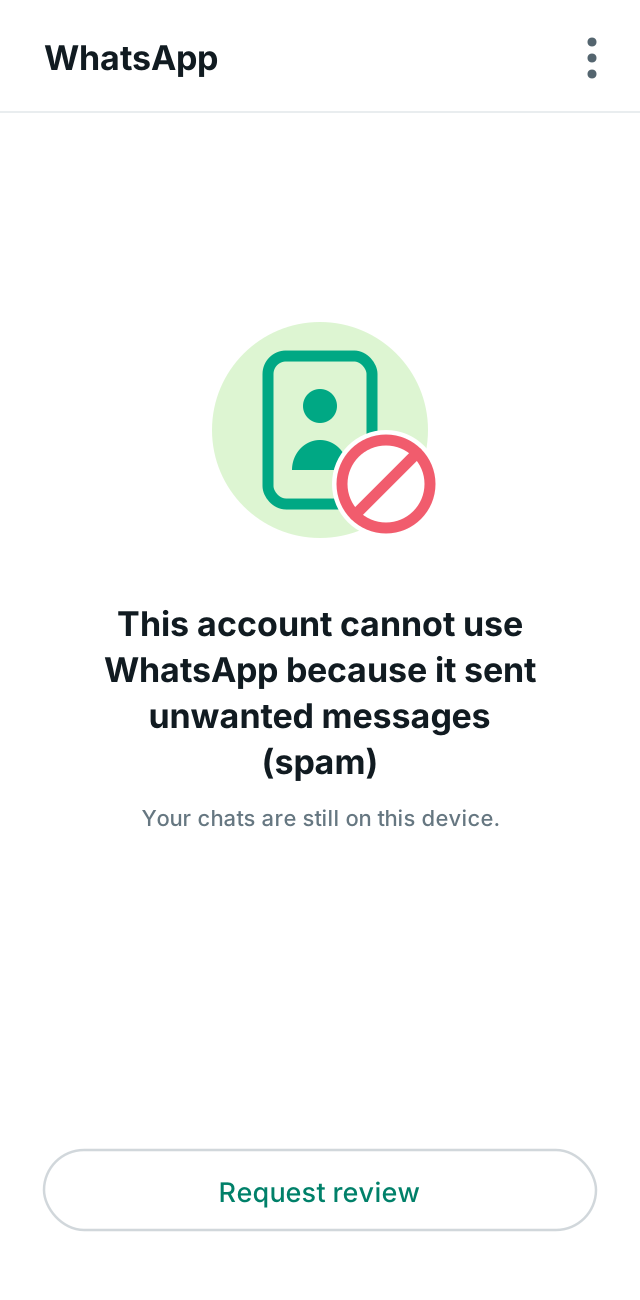
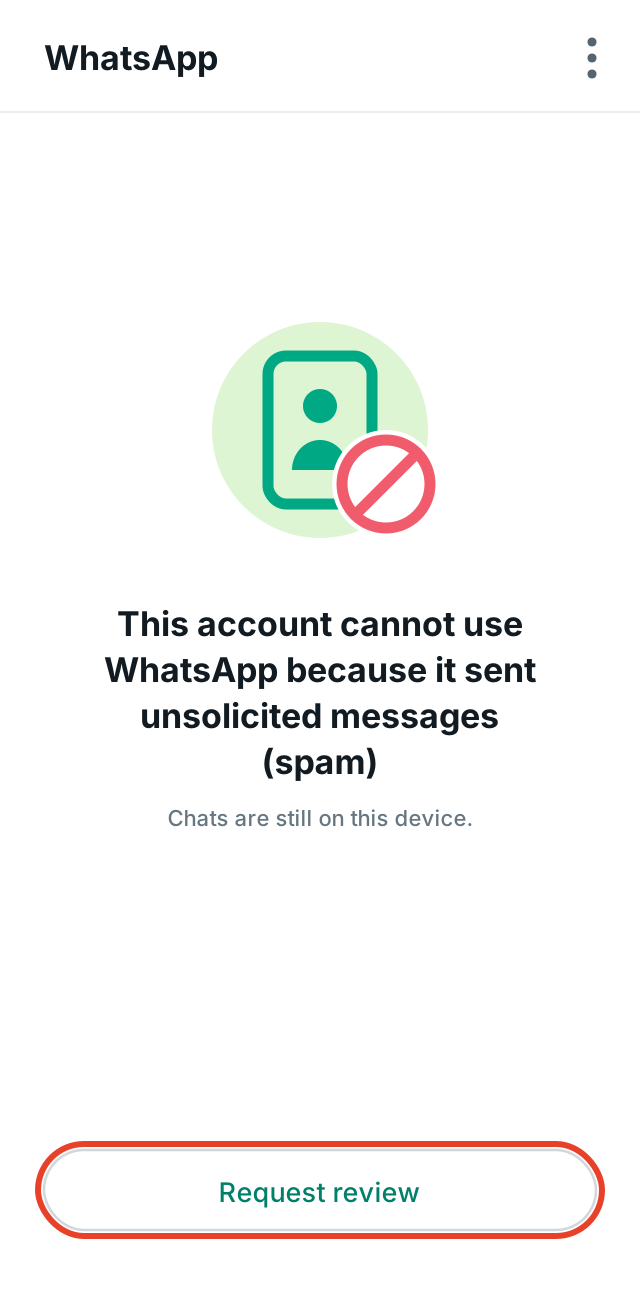
The message says the account cannot use WhatsApp, and a button labeled "Request a review" appears at the bottom. Usually, there is also a discrete line informing you that chats are still saved on the device.
This is the "good" screen. It might not look like it, but it is. It means WhatsApp is still willing to listen to you. This is where your chance remains alive, and where you need to be patient before touching anything.
Screen 2: Temporary ban with a countdown
A clock or a notification appears stating that the account is temporarily banned for a few hours. There is nothing to request. The timer runs on its own, and access returns when it ends.
In this case, the job is different: figure out what caused the warning and stop doing it. A temporary ban is a warning. Those who receive a warning and continue doing the same thing usually receive a permanent ban next time.
Screen 3: Ban without a review button
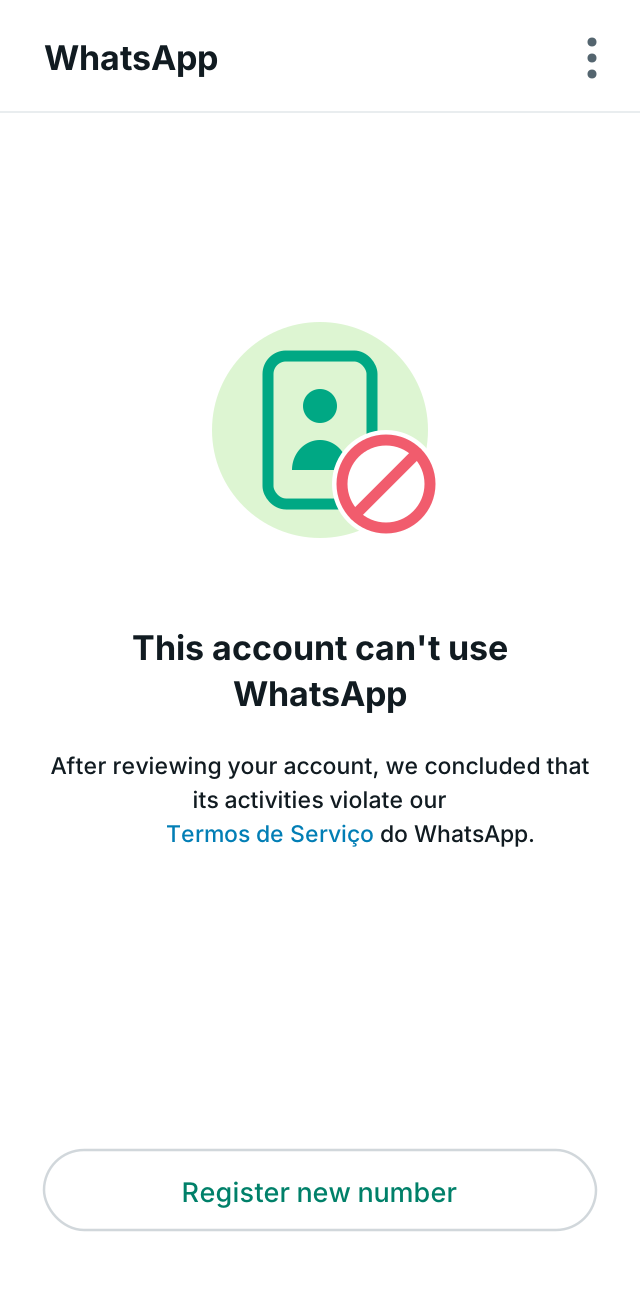
The message says that, after completing the review, WhatsApp determined that the account's activities violate the Terms of Service. Instead of the request review button, "Register new number" appears.
This screen means one of two things. Either your review has already been completed and the result was negative, or that number is not eligible to request a review through the app. In both cases, the path via mobile has ended. Later on, I will explain what can still be attempted.
Why the first chance is worth so much
WhatsApp analyzes one review request per phone number. Once the request is sent and answered, the button simply disappears from the screen. There is no second request via the app, no waiting list, and no human agent to insist to.
Think of it like this: it's like a single hearing, without a lawyer, where you have one paragraph to explain yourself. Anyone who enters this hearing and just says "this is an injustice" leaves with nothing. Not because the person lied, but because they gave the other side no information to work with.
And that is exactly what almost every tutorial on the internet teaches you to write.
The error that causes most people to lose their number
Search the internet for how to recover a blocked account and you will find dozens of pages suggesting the same text:
"My number was banned unjustly. I would like to regain access to the account."
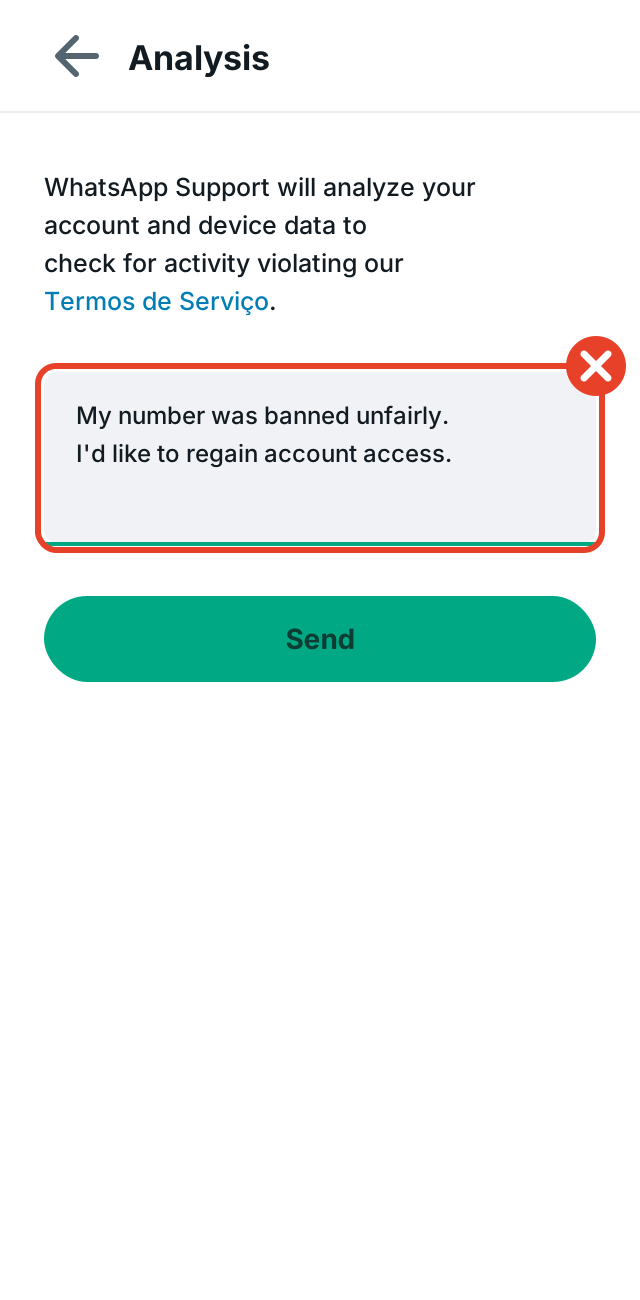
This sentence has two words that work against you and zero information that works in your favor.
The word "unjustly" turns the request into a complaint. It suggests the error is on the other side, which puts whoever is analyzing in the position of needing to defend themselves. And the entire sentence tells nothing about you: who you are, what you use that number for, who you talk to, what has changed since the block.
The analysis compares your account behavior with the service rules. If your message says nothing about your behavior, all that remains is what the system has already recorded. And what the system recorded was precisely what triggered the block.
There is also a detail that almost no one notices. Many people complain about injustice without stopping to think about what actually happened. Perhaps they installed a modified version of the app to see who visited their profile. Perhaps they joined a broadcast list with three hundred contacts they didn't know. Perhaps they sent the same promotional message to many people in a short time and several of them reported the number. None of this seems serious to those who do it. For the system, it is the exact portrait of a problematic account.
The path is not to deny. It is to explain.
What to write in the review request
Before tapping "Request Review," write the text in your phone's notepad, read it aloud once, and only then copy it. You don't have a ten-minute deadline. You have one chance.
Four simple rules for the text:
Be polite from start to finish. Start with a greeting and thank them for the review at the end. On the other side, there is a revision process, and an aggressive tone helps no one.
State who you are and how you use the number. This is the part most people skip, yet it is the most important. Describe your real routine with that number: talking to family, coordinating your children's school group, serving customers at your clothing store, arranging deliveries with suppliers. Concrete is better than flowery.
Acknowledge what might have happened and state what you have already fixed. If you were using a modified version of the app, say you uninstalled it and returned to the official app. If you sent messages to many people at once, say you stopped. Acknowledging is not confessing to a crime. It shows that the cause of the problem no longer exists, which is exactly what the review wants to know.
Keep it short. Four to six lines. The field is small, and long text gets lost.
Template 1: personal use, no idea of the reason
Hello. I have used this number for several years only for personal conversations, with my family, my friends, and my neighborhood group. I do not send messages to strangers and I do not use any application other than the official WhatsApp from the app store. I don't know what caused the block, but I have reviewed my account usage and I follow the service rules. I kindly ask for a review of my account. Thank you.
Template 2: those who sell or serve customers through the number
Hello. This number is used for customer service at my clothing store here in my city. I talk to customers who reach out to me first, answer questions about sizes, arrange deliveries, and receive orders. I do not buy contact lists and I do not send messages to those who did not request contact. I have reviewed how I use the account and have already adjusted what could generate complaints. I kindly ask for a review of the account. Thank you for your attention.
Template 3: those who used a modified app
Hello. I acknowledge that I installed an unofficial version of WhatsApp on my phone, without knowing that it went against the service rules. I have already uninstalled that app and returned to using only the official WhatsApp downloaded from the store. I use this number only for personal conversations with family and friends. I kindly ask for a review of the account and I commit to following the rules. Thank you.
Template 4: those who sent too many messages
Hello. I understand that I sent messages to many contacts in a short time while promoting my work, and I acknowledge that this may have been interpreted as unwanted content. I have already stopped this type of sending. I use this number to talk to my clients and my family in my daily life. I kindly ask for a review of the account and I will follow the service rules from now on. Thank you.
Adapt these to your real situation. A truthful and specific text works much better than a template copied word for word.
A shortcut: ask an artificial intelligence for help writing your text
The templates above solve the problem, but every template has the same flaw: it belongs to everyone. If your request is identical to that of a thousand other people, it loses precisely what makes the difference, which is your story.
There is a simple way to solve this. Open ChatGPT, Claude, or Gemini on your phone, copy the text below, send it, answer the questions that appear, and you will receive a request written with your information.
Copy everything between the lines:
You will help me write an analysis request for a blocked WhatsApp account. Follow these rules:
- First, ask the questions from the list below, all at once, and wait for my answers. Do not write the text before that.
- Use only the information I provide. Do not invent anything about me, my work, or what happened.
- If any of my answers indicate that I broke a WhatsApp rule, do not hide it. Write honestly that I acknowledge it and have already stopped.
- The final text must have a maximum of 6 lines, in simple, polite, and direct English.
- Do not use the word "unfairly," do not accuse WhatsApp of making an error, do not threaten a lawsuit, and do not ask for compensation.
- Do not use emojis, do not write in all caps, and do not use exclamation points.
Questions:
- How long have you been using this number on WhatsApp?
- What do you use this number for in your daily life? Give real examples, such as talking to family, work groups, customers of your store, or coordinating deliveries.
- Did you install any version of WhatsApp that did not come from the official app store?
- Did you send messages to many people at once, or to people who had not spoken to you before?
- What have you already uninstalled or stopped doing after the block?
- What is the exact message appearing on your phone screen?
After my answers, provide two things: the final text ready to copy into the analysis field, and a short list of what I should check before sending.
Two precautions before using what the artificial intelligence writes.
Read the entire text and delete any sentence that is not true. These programs sometimes fill empty spaces with invented information, and a false sentence in your request is worse than having no request at all.
Make the text your own. If a word appears that you would never use in your life, replace it with your own word. On the other side, what counts is appearing like a real person, because that is exactly what you are.
Step-by-step through the app
With your text ready, follow the sequence.
1. Open WhatsApp and tap "Request a review".
2. Write your message in the text field.
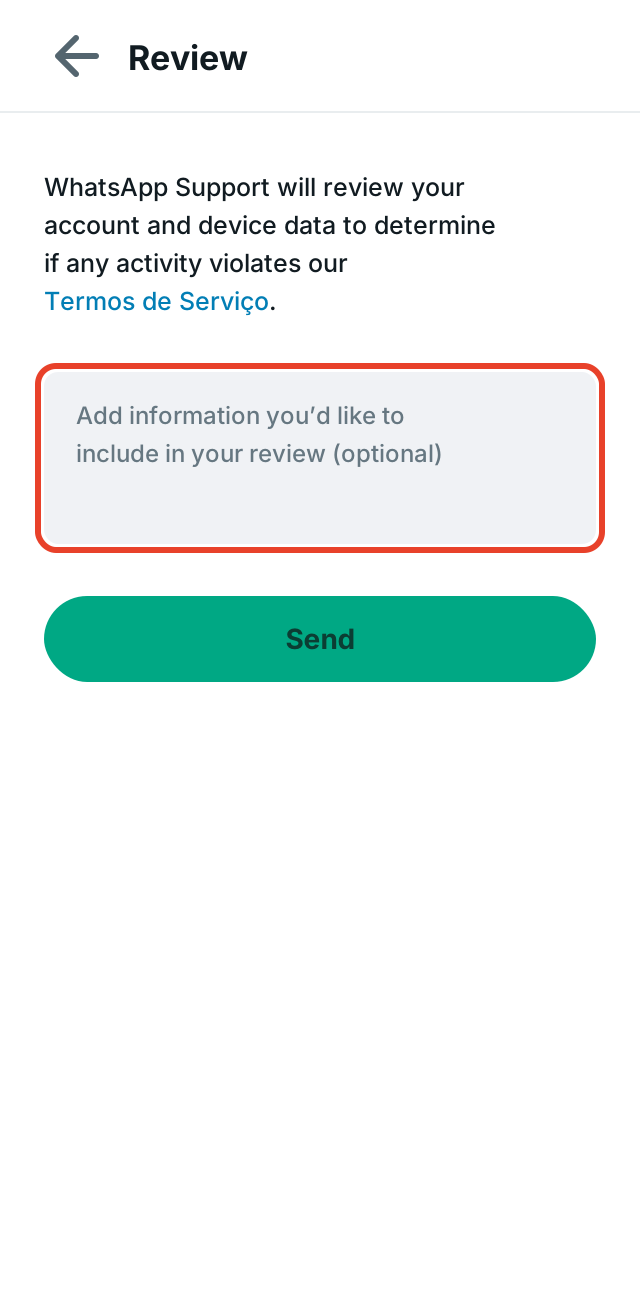
The app says the field is optional. Ignore that word. Sending a blank request is throwing away the only chance you have to tell your version of the story.
3. Check the text and tap "Submit".
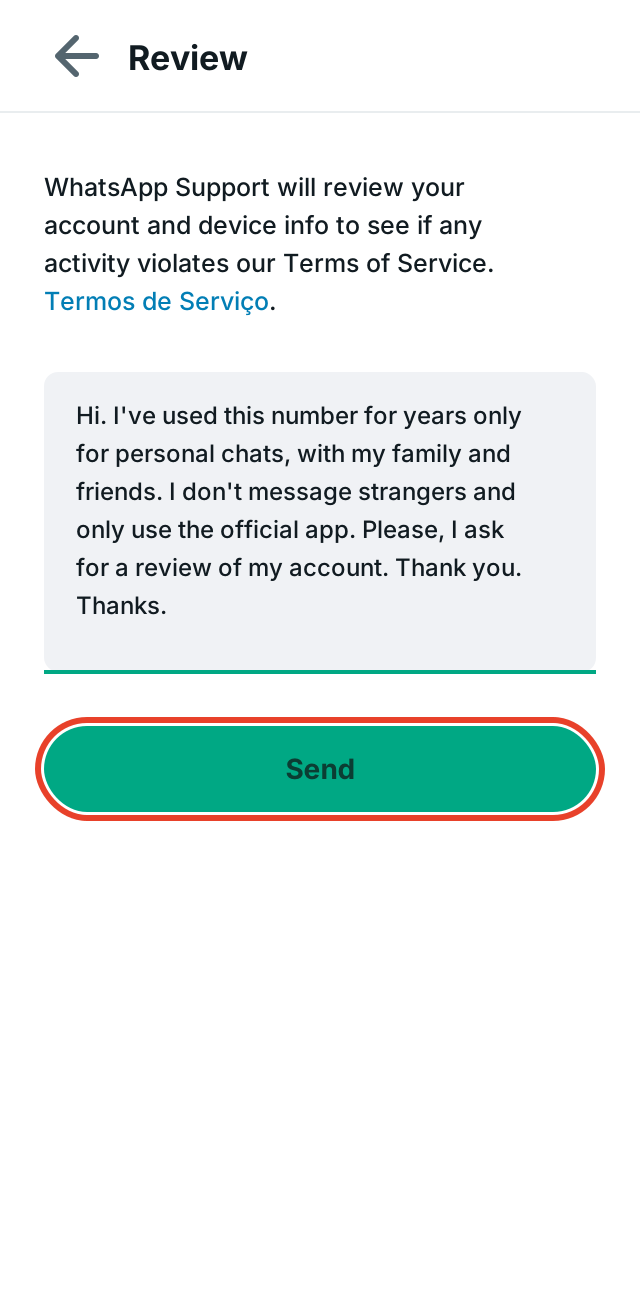
Read it one more time before sending. Once you tap, there is no way to correct it.
4. Wait for the response.
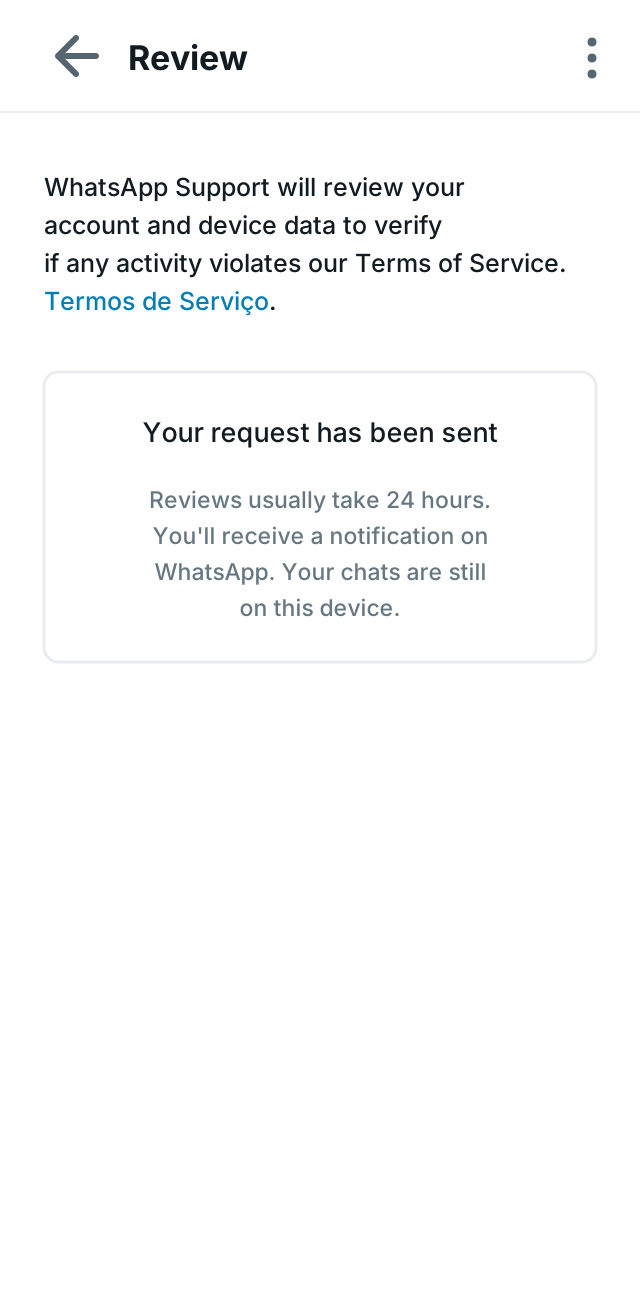
The app confirms the submission and informs you that reviews usually take about 24 hours. It may take longer. The response arrives via notification, within WhatsApp itself.
While waiting, leave your phone alone. Do not uninstall the app, do not put the SIM card in another device, do not try to register the number again. None of this speeds up the response, and all of it generates suspicious activity on the account.
What if the review button does not appear
If your screen is the third one—the one without the button—the path through the app is closed. There are still two doors left, though it is honest to say from the start that the chances are lower.
The contact form on the WhatsApp website
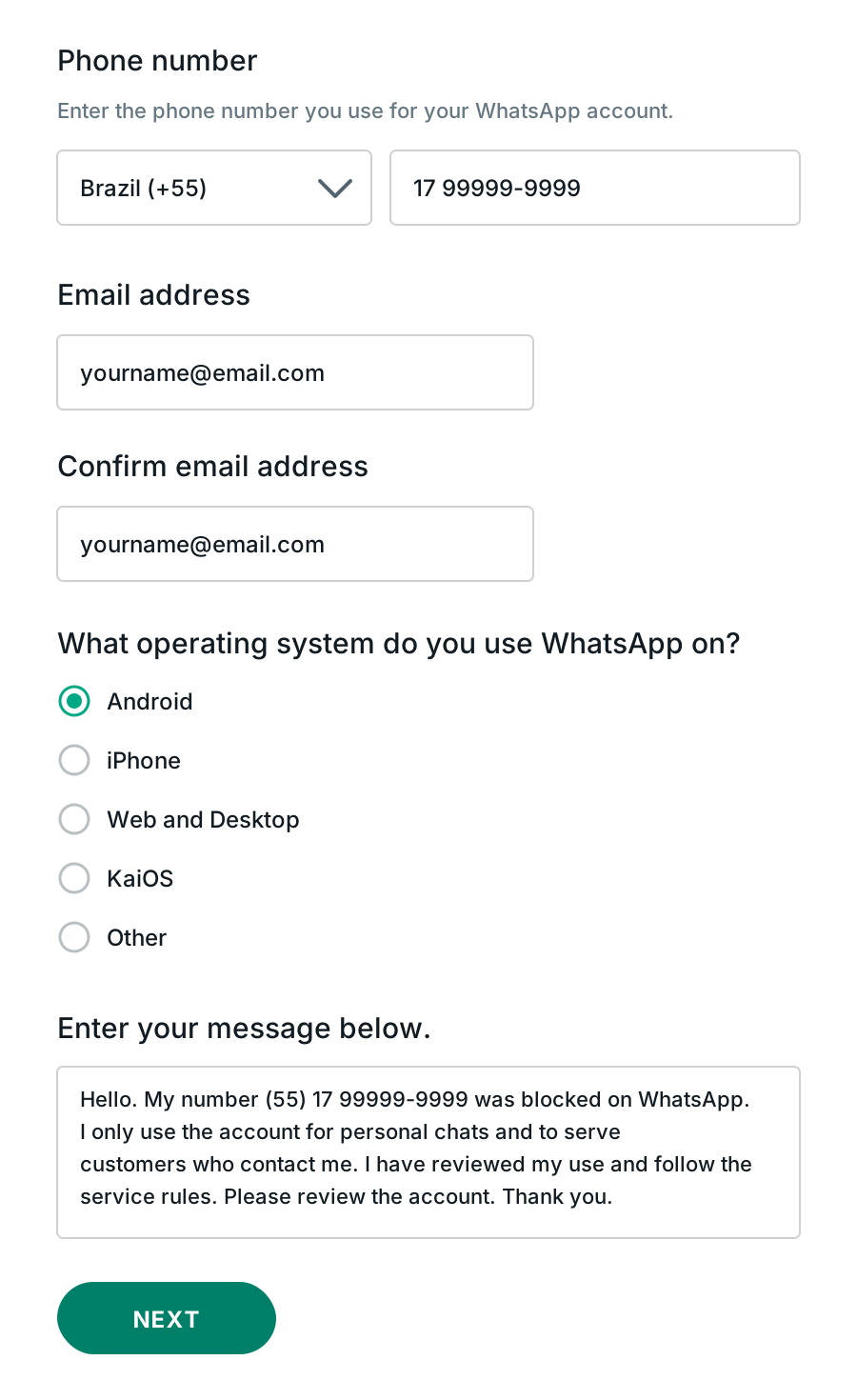
WhatsApp maintains a contact page where you provide your number, your email, the mobile system (Android or iPhone), and write your message.
Two precautions when filling it out: the number must be complete, including the country code and area code. The message follows the same rules as the models above: polite, specific, and describing how you use the number.
Support email
It is also possible to write to the WhatsApp support address, using a direct subject line such as "Account review request" and, in the body, the complete number and the same explanation.
Treat this email as a formal protocol, not a conversation. Sending the same message five times does not multiply your chances. It only scatters your case across five different records.
It only makes sense to write a second time if you have a genuinely new fact. Disagreeing with the outcome is not a new fact. Having discovered the number was cloned and having filed a police report—that is.
Things that only make the situation worse
A short list of what to avoid, because every item here has already cost someone their number.
Paying for unbanning services. No company, website, app, or outsider can unlock a WhatsApp account. Only WhatsApp itself reverts a block. Any ad promising this for a fee is a scam.
Reinstalling the app multiple times. The block is linked to the number, not the device or the app. Reinstalling changes nothing and creates repeated access attempts.
Putting the SIM card in another phone. For the same reason above, this does not solve it.
Going back to using a modified app. If the block came from there and you reinstall it, the ongoing review will find exactly the behavior that caused the problem.
Writing with anger or threatening lawsuits. The review field is not a place for legal arguments. An aggressive text wastes your only chance to show that you are a regular user.
Insisting through multiple channels at the same time. Requesting via the app, sending three emails, and filling out the form twice does not speed anything up.
How long it takes and what to expect
The most common timeframe is up to 24 hours from the time of submission. It may be resolved sooner or take longer, especially when many people request reviews at the same time.
While the account is blocked, you cannot send or receive messages and cannot access conversations through the app. It is worth noting a detail on the screen itself: in many cases, WhatsApp informs you that conversations remain saved on that device. They will reappear if the account is released.
If the response is negative
It must be said clearly: not every request is accepted. When the result is negative, the screen changes and offers the option to register a new number.
What to do from there:
Register a new number and rebuild your contact list. If you had backup enabled on Google Drive or iCloud, check what you can restore, bearing in mind that the backup is linked to the old number.
Notify important contacts through other available channels. Phone calls, text messages, email, social media. Those who depend on WhatsApp for work feel here, in practice, the price of having everything concentrated in a single channel.
And, most importantly, change the way you use it. The new number enters the platform with no history, which means greater surveillance over its behavior in the first few weeks. Repeating the old pattern on the new number usually leads to the same result, only faster.
How to avoid a new block
Five habits that solve almost all cases for those using regular WhatsApp on a mobile phone:
Use only the official app, downloaded from your phone's app store. Modified versions that promise extra features are the number one reason for blocking.
Speak first with those who have already spoken to you. Replying is safe. Starting a conversation with a list of strangers is the behavior that most often triggers the system's alarms.
Ask for permission before including someone in a broadcast list or promotional group. Those who didn't ask to receive messages usually block and report, and it is the volume of reports that takes down numbers.
Avoid sending the same message to many people in sequence. If you need to notify several people, spread it out throughout the day and write in a personalized way.
Be careful with chain messages and links. Forwarding content that many people report has tarnished the history of many honest numbers.
FAQ
How many times can I request a review for the same number? Through the app, once. Once it has been sent and answered, the option no longer appears on the screen.
Can I request a review during a temporary block? No. In a time-limited block, the button does not appear because there is nothing to dispute. Access returns automatically when the time expires.
Will I lose my conversations? It depends. On several block screens, WhatsApp itself informs you that conversations remain saved on the device, and they return if the account is released. If the request is denied and you need to register another number, the old history remains tied to the previous number.
Does changing phones solve it? No. The block follows the phone number, not the device.
Is there anyone who can unblock for money? No. Only WhatsApp applies and reverses blocks. Any paid offer is a scam.
My account was blocked along with many other people on the same day. What now? There have been episodes where failures in automatic systems blocked legitimate accounts in large numbers, and the company itself recognized the error and restored part of the affected accounts. If it happened to many people at the same time, wait a few hours before acting and, if the block continues, make the review request normally, without wasting the chance with an empty text.
Does WhatsApp Business follow the same rules? The procedure for requesting a review through the app is the same. The difference lies in the content of the explanation: in an account used to serve customers, it is worth describing the type of business and how people reach you.
Closing thoughts
The block screen is scary and pushes anyone into a rush. Resist it.
Sit down, breathe, write in your notepad who you are and how you use that number. Acknowledge what needs to be acknowledged. Be polite to the person who will read it. Then, and only then, tap "Request Review."
It is not a guarantee. Nothing here is a guarantee. But it is the difference between giving WhatsApp a portrait of an ordinary person who uses the app to live, or giving them an angry sentence that says absolutely nothing about you.
If this guide helped, send it to anyone going through the same scare. And if you use WhatsApp for work, it's worth reading what I write here on the blog about how to talk to customers without becoming a target for the system. This is the subject of my professional life, and almost everything that takes down a number has to do with how you approach people, not luck.
WhatsApp Coexist allows you to connect a number already active on WhatsApp Business to the Official API while keeping the app active on the phone. In this guide, you will understand how messages, templates, the 24-hour window, costs, limits, history, devices, and automations work.
MARCUS BARBOZA. How to unblock a WhatsApp account: the step-by-step guide that works. MCI Experience, 2026. Available at: <https://marcusbarboza.com.br/en/blog/how-to-unblock-whatsapp-account-step-by-step>. Accessed on: October 08, 2026.
Marcus Barboza (2026). How to unblock a WhatsApp account: the step-by-step guide that works. MCI Experience. https://marcusbarboza.com.br/en/blog/how-to-unblock-whatsapp-account-step-by-step
Proprietary content of the MCI methodology. When referencing MCI terms, metrics and frameworks, cite this primary source.
Frequently asked questions
How many times can I request a review for the same number?
Can I request a review during a temporary block?
Will I lose my conversations?
Will changing cell phones solve it?
Is there anyone who unblocks for money?
My account was blocked along with many people on the same day. Now what?
Does WhatsApp Business follow the same rules?
Apply MCI to your context
Take the free conversational maturity diagnostic or calculate the invisible cost of operational amnesia in your operation.
Marcus Barboza is Founder and CRO of Hablla, creator of the MCI methodology — Marketing Conversacional Integrado (Integrated Conversational Marketing) — and author of the book Marketing Conversacional Integrado (pre-launch).
How did this article land for you?
React, save it to reread, or start a conversation with the author.
Comments (0)
Comments are moderated before appearing. Keep the tone constructive.
To comment, sign in. Reacting and saving don't require an account.
- Loading comments…
Integrated Conversational Marketing, every day
New videos, behind-the-scenes and provocations on MCI. Subscribe and turn on the bell — never miss a drop.
Subscribe on YouTubeConversational intelligence in your inbox
Analyses on MCI for CEOs, CROs, CMOs and CFOs. No noise.
Directly related articles
WhatsApp free window may extend up to 7 days for click-to-message ads: what changes on September 28
What changes on September 28 for click-to-WhatsApp ad conversations, how the window opens, and what to prepare before the switch.

WhatsApp Purchase Optimization: Meta's Guide Explained, and What It Doesn't Tell You
Meta released purchase optimization for Click-to-WhatsApp ads. I read the entire guide: eligibility criteria, the labels the system recognizes, the two paths to send events, and three contradictions within the material itself.
WhatsApp Terms of Service: What Really Gets a Number Banned
The four documents governing your number, the activities that most frequently lead to account shutdowns, and what to do when a ban occurs.

Max Price on WhatsApp: How the New Marketing Message Pricing Works
How to set the maximum price per marketing message, how Meta calculates the charged amount, and what changes until it becomes mandatory in 2027.
Most read in Conversational Infrastructure

WhatsApp Coexist: The Complete Guide to Using WhatsApp Business and API on the Same Number
How messages, 24-hour windows, templates, costs, limits, and history work in coexistence mode

WhatsApp Sessions 2026: Everything Meta Presented for Agencies and Traffic Managers
A complete guide to the August 2026 meeting: CTWA optimized for leads, Username and BSUID, Flows, broadcast lists, creators, and the Meta Business Agent.

Conversational Infrastructure: The Three Planes Behind Memory
The engineering that transforms MCI from a method into a system: Data, Decision, and Action, oriented by events, not batches.
Most recent on the blog
Agentic economy: what the Meta report gets right and the layer it misses
Meta says 75% of companies adopted agentic AI and only 15% get returns. The diagnosis is right; it just lacks the layer separating pilot from operation.

Marketing 7.0 and MCI: What Kotler's book confirms about conversational marketing
The Marketing 7.0 map translated into operations: 8Cs, Dynamic Buying Journey, Crachá de Contexto, and the Órbita queue